Download VPS‑SIS
Click the button below to download the latest version of the Vatican Philatelic Society Inventory System (VPS‑SIS) as a ZIP archive.
Download VPS‑SIS (08/02/2026 ZIP file - 2.63GB)
Installation Options
Installing on Hard Disk (but you can install anyplace your want)
- Click the Download VPS‑SIS button above.
- Save the file
VPS‑SIS.zipto your computer (usually in the Downloads folder).

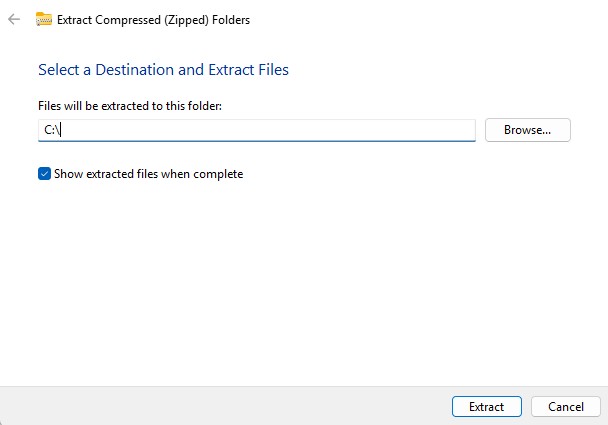
- Click on
VPS‑SIS.zip - ChickExtract All….
- Choose the destination where you want to the program and data files to be stored
- Click on the Extract and complete file extraction. will complete
Security Programs & Antivirus Considerations
VPS‑SIS uses a lightweight local web server (such as Mongoose) to serve pages on your own machine. Some antivirus or “internet security” suites may flag this behavior as unusual.
- Warnings about “unknown publisher” or “local web server.”
- Blocking access to
http://localhost:8080or similar URLs. - Quarantining the SIS executable or batch file.
Suggested Workarounds
- Allow the program: In your antivirus or security suite, mark the SIS executable and its folder as trusted or allowed.
-
Exclude the SIS folder: Add the SIS installation folder (e.g.
C:\VPS-SIS) to your antivirus exclusion list. - Temporarily relax protection: If your suite has an aggressive “lockdown” mode, switch to a standard mode while installing and testing SIS.
- Verify the source: Only run SIS if it was downloaded from the official VPS download page and OneDrive link.
Ensuring Port 8080 Is Available
VPS‑SIS typically uses port 8080 on your local machine to serve the web interface. If another program is already using port 8080, SIS may fail to start or your browser may not connect properly.
- Check for other servers: Close any other local web servers, developer tools, or applications that might be using port 8080.
-
Firewall rules: Ensure your firewall allows local connections to
http://localhost:8080. -
Browser test: After starting SIS, open your browser and go to
http://localhost:8080. If the SIS home page appears, port 8080 is working.
Final Notes (and Donuts)
If everything works, you now have a fully functional local Vatican Philatelic Society Inventory System. At this point, tradition strongly suggests:
- Sending a thank‑you note (and metaphorical donuts) to the VPS webmaster.
- Including an extra box of virtual donuts for his friend, CoPilot, who helped build this page.